
Content Workflow

What is a Content Workflow?
WordPress teams often struggle with questions like:
- Who is reviewing this post?
- Is it approved yet?
- What’s the next step?
- Who moved this post forward?
Content Workflows solve this by giving every post a clear, visible path and removing guesswork from the editorial process.
A Content Workflow in Multicollab is a step-by-step editorial process that helps teams manage how content moves from draft to publication inside WordPress.
Instead of tracking progress through external tools like Google Docs, Slack messages, or spreadsheets, Content Workflows keep everything inside the WordPress editor, where the content is actually written and published.
Multicollab's Content Workflow defines:
- The stages a post must go through
- Who is allowed to move content forward at each stage
- The current status of every post
- Who is responsible for the next action
Who Should Use Content Workflows?
Content Workflows are ideal for teams that:
- Follow review or approval processes
- Work with multiple writers and editors
- Update published content frequently
- Need accountability and permissions
- Manage content across large or complex sites
- Coordinate reviews and deadlines in Slack
Important Notes:
- Only administrators can create or modify workflow steps and permissions.
- Content Workflows work alongside commenting and suggestions.
- Real-time collaboration settings are managed separately.
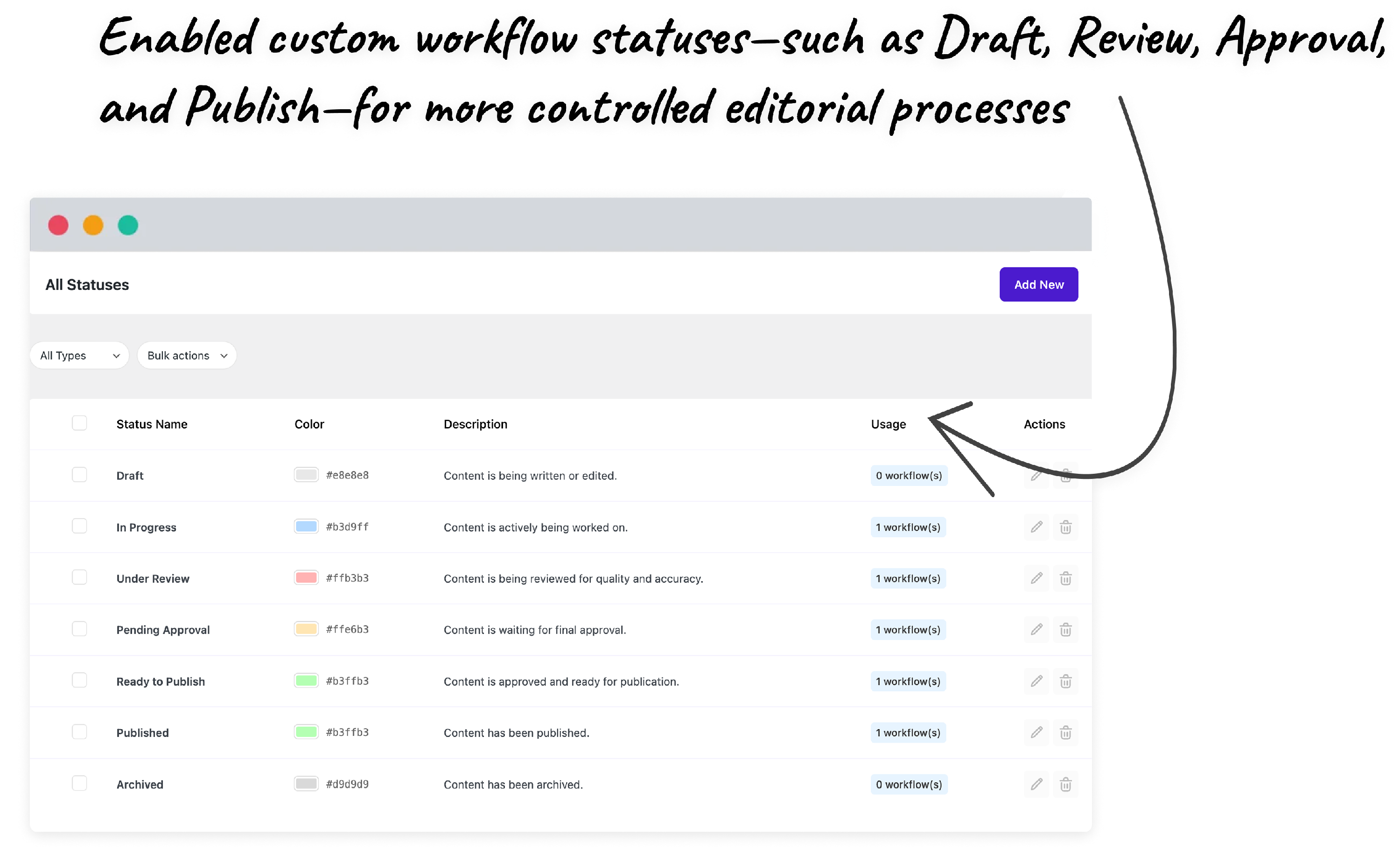
Learn how to add custom workflow steps to suit your unique editorial requirement.
🆕 Get Workflow Updates in Slack:
Now , Multicollab can send real-time Slack messages for Content Workflow events, so your team sees review activity in a shared channel without opening WordPress first.
You can turn on notifications for:
- Review assigned: A workflow is assigned to a reviewer.
- Deadline overdue: A workflow passes its deadline without being completed.
- Published: A post or page goes live when the final workflow step is completed.
To set it up, enable the Workflow Management module, connect Slack under Multicollab > Integrations > Slack, choose a channel, and turn on the toggles you need under the Workflow Management tab in Slack Settings. Slack workflow notifications require the Multicollab PRO plan.
Important Notes:
- Only administrators can create or modify workflow steps and permissions.
- Content Workflows work alongside commenting and suggestions.
- Real-time collaboration settings are managed separately.
- Slack notifications for workflows are managed under Multicollab > Integrations > Slack. Overdue alerts need WP-Cron running on your site.
Frequently Asked Questions (FAQs):
-
What are Content Workflows in Multicollab?
Content Workflows let you create custom review steps like Draft, Review, or Approval and assign permissions for each stage. Your team can follow a clear process directly inside WordPress.
-
Can I update published content using workflows in Multicollab?
Yes. With the new Create Version feature, you can make changes to a published post, send the update through your workflow, and merge it only after approval.
-
How do the global controls for Real-Time Collaboration in Multicollab work?
Admins can enable or disable real-time editing for all posts, selected posts, or specific categories. This gives you more control over where live editing is allowed.
-
Does Multicollab 5.2 work with WordPress 6.9?
Yes. Version 5.2 is fully compatible with WordPress 6.9 and tested to run smoothly in the latest block editor environment.
-
Do workflows slow down the editor?
No. Multicollab Workflows are built directly into Gutenberg with lightweight logic, so status updates and assignments function without affecting editor performance.
-
Can anyone change workflow steps or permissions?
No. Only administrators can create steps, edit permissions, or modify workflow settings.
-
Do global collaboration controls affect suggestion mode?
Yes. When real-time collaboration is disabled for a post or category, suggestion mode and commenting still work normally.
-
Is there a limit to how many workflow steps I can create?
No. You can create as many steps as your editorial process requires.
- Can Content Workflows send notifications to Slack?
Yes. Multicollab can post Slack messages when a workflow is assigned to a reviewer, when a workflow deadline is overdue, and when a post is published through the final workflow step. Each notification has its own toggle, and the feature requires the Multicollab PRO plan.
-
Do Slack @mentions in workflow notifications notify reviewers?
Only when the names match. Multicollab builds each @mention from the part of the reviewer's email before the @, so rishi@company.com only pings a Slack user named @rishi. If usernames don't match, reviewers can follow the workflow channel directly.